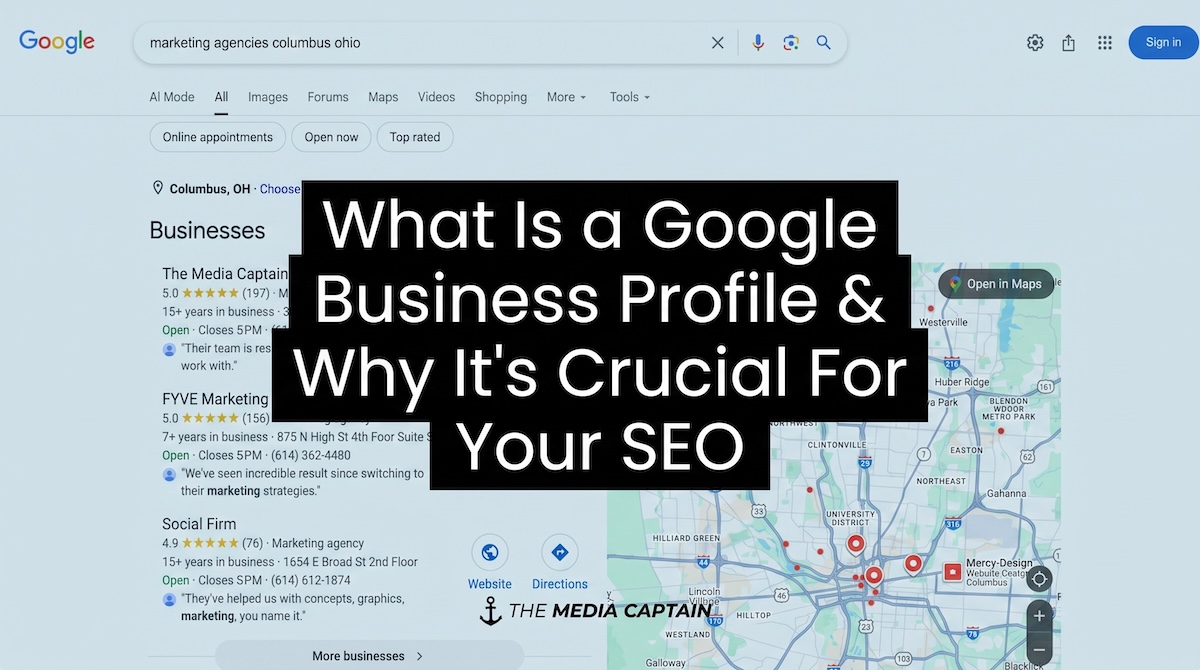
Roughly 44% of clicks on page 1 of Google for local businesses come from the Map Pack.
The Map Pack rankings, which you can think of as the most valuable organic place to rank on Google for local businesses, are primarily determined by how well-structured and optimized your Google Business Profile (GBP) is.
Your GBP is also essential for visibility in AI search platforms, with direct influence on how platforms like Google’s Gemini provide their recommendations.
We’ve helped hundreds of clients increase their visibility and leads with GBP audits and optimization over our 15+ years as a marketing agency.
We’ll cover everything you need to know in this guide so you understand the importance of your GBP and how to optimize it to generate more organic clients for your business.
1. What Is a Google Business Profile
You can think of your Google Business Profile (which was formerly called Google My Business) as your digital business card or social media profile for Google.
It costs no money to claim or optimize, and includes your key company information like address, hours, photos, as well as user reviews and services/products.
The importance of ranking prominently (ideally in the #1 position) can be showcased by the following example.

The Media Captain ranking #1 for ‘marketing agencies columbus ohio’
Notice how:
- It’s the first section that pops up on Google for a local search (before the “10 blue links” of the traditional organic listings).
- There are only three businesses listed, reiterating its exclusivity.
- It gives searches a snapshot competitor comparison, letting them measure your proximity to the businesses’ physical location and the user sentiment of a business in a blink.
This is why businesses invest heavily to gain one of the top 3 spots in the Map Pack, including by paying for ads, which we’ll discuss later.
Nearly half of all Google searches are local-based, and GBP actions have increased 41% year-over-year (according to Digital Applied).
Even in a world where search habits are fragmented, your GBP remains a growing source of potential for your business on Google, which is still the #1 place in the digital space you need to own to succeed in your local SEO strategy.
2. Why Google Business Profiles Are Important for Local Businesses
Your GBP is important for two primary reasons:
- Prominent exposure = more clicks, which can result in substantially more organic leads. It also gives users a digital snapshot of your business, most notably your reputation in the community via user reviews and star ratings.
- It can drive those organic leads directly through click-to-call buttons, get-directions buttons, booking links and website clicks. In other words, if you have the appropriate configurations, people don’t even need to leave your GBP to do business with you.
Let’s expand on each of these in more detail.
Reputation / Exposure
To reiterate, roughly 44% of clicks on page 1 of Google for local search queries come from the Map Pack/Google Business Profile.
Your GBP is your biggest asset to rank in the most significant portion of Google’s local search engine results page (SERP).
Beyond the exposure you get from high rankings in the Map Pack, there’s a reputational aspect that is equally important.
People can scan through dozens of reviews from others in your community and decide whether to do business with you before they even talk to you.
This is how powerful your Google Business Profile can be. If you make the extra effort to provide 5-star service and get a 5-star review on your GBP, you’re getting a public stamp of approval that all future potential clients can see.
In our GBP analysis of 450+ local businesses ranking in the local Map Pack across 30+ verticals, we found that Position 1 averaged 255 reviews on their profiles.
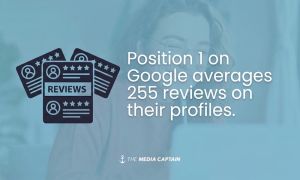
Higher review counts typically correlate to stronger Map Pack rankings, but it goes well beyond just ranking highly for local queries, including “near me” searches.
It’s a trust signal that can be the difference between somebody choosing to call you or a local competitor.
Reviews are not the only factor that can affect your reputation among local searchers.
In the same analysis we cited above, we found that GBP listings with photos are twice as likely to appear as reputable.
This data point underscores the importance of completing your profile in full, which we will discuss in detail later.
It’s not just important for helping Google’s algorithm understand your business (which it works in tandem with your website to accomplish); an incomplete profile without photos looks untrustworthy.
Quick Aside: Our Original Research Was Cited
Due to our extensive daily work with Google Business Profiles, we detected a local algorithm trend we called “Swapasaurus” that was picked up by Search Engine Roundtable pertaining to a Bedlam update.
Using research from our client base, The Media Captain founder, Jason Parks, noticed that Google’s local “Bedlam” update mostly reshuffled positions #2 and #3 in the local pack while #1 stayed comparatively stable.
The theory sparked discussions in the Local Search Forums and among other well-known local SEOs (Joy Hawkins weighed in on the same update, attributing it to relevancy rather than proximity).
While this trend was discovered in 2019, GBP rankings can still fluctuate significantly. Consistent monitoring is crucial to any modern local SEO/AI search strategy.
Drive More Leads
Beyond reputation/exposure, your Google Business Profile can directly funnel leads to your business without the user ever having to click through to your website.
To demonstrate this, see the circled buttons below:

Users can get directions to your physical location, call or message your office and even book appointments – see below from Google – directly from your GBP:

The number one goal of your GBP (and local SEO in general) is to drive more organic leads.
Achieving prominent exposure, building a solid reputation and making it as easy as possible for a potential client to contact your business are all necessary to generate more revenue.
It’s all contingent on how your GBP is built and maintained, which we’ll cover extensively in the next section.
3. Best Practices for Succeeding With Your Google Business Profile
In this section, we’ll cover the following:
- Setup & Structure
- Features & Growth
- Compliance & Reputation
3.1 Setup & Structure
Getting the profile itself correctly built and configured.
When setting up your GBP, there are two tiers of information you need to fill out. Tier 1 will be your highest-impact information, while Tier 2 will be less important but absolutely still worth doing.
Tier 1 GBP Optimizations
The following information should be the highest priority to fill out correctly when setting up your profile:
- Business name – Your business name is an important Map Pack ranking signal, and including relevant keywords naturally can help your rankings. However, don’t try to manipulate Google in any way by keyword stuffing with queries that are not legitimately the name of your company. You can be penalized by Google for using keywords that aren’t a part of your registered business name.
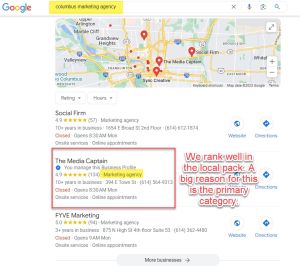
- Primary category – Some consider the GBP primary category as the most important Map Pack ranking signal. It tells Google what your main service offering is, and should be heavily influenced by your objectives and main source of profitability. You can add up to nine secondary categories to cover verticals that differ from your primary category.
- Linking to proper URL – Every GBP should have a landing page linking to your website, and many companies get this wrong. If you manage a single location, then you can link to your website’s homepage. For multi-location businesses, you should have separate GBP’s for each location, and they should all link to city-specific pages on your website. Once you’re managing more than a handful of locations, look into bulk uploading and editing GBP locations, as this will save you valuable time.
- Review acquisition – Over 90% of consumers read online reviews before visiting a local business. You should be proactive in seeking reviews for your GBP. Set up automated email/SMS campaigns, put signs with QR codes asking for reviews throughout your office and make it a point to ask customers you know had a good experience for a 5-star review. And make sure to respond to all reviews (even the negative ones).
- Proximity – Your proximity of address to the point of search is a very influential Map Pack ranking factor. However, if you’re already entrenched in a location, then this is the address you must use. If you’re considering moving or adding a new GBP location, then you can be strategic about picking the best GBP location to generate more leads.
Related: Google Business Profile: Address vs. Service-Area Business vs. Hybrid (Best Practices)
- Spam fighting – Even though Google has been crystal clear about not trying to game the system to achieve better rankings, businesses still do it. Spam fighting is canvassing the local competition to find companies that are trying to circumvent the rules – by keyword stuffing, for example – and reporting them (we’ll tell you how to do this later). This can help your business achieve higher rankings in the Map Pack by weeding out the bad actors.
Note: If your business has multiple individual professionals (think individual medical doctors within a medical practice, or stylists within a salon), a practitioner listing lets each person claim their own profile, category, and reviews separate from the main business listing. This could be a fit for some businesses to distinguish the practitioner listing, but note that it can get messy managing multiple practitioner listings. Make sure you’re prepared by maintaining access to all the listings in case you need to make changes.
Here’s an example of practitioner listings:

Tier 2 GBP Optimizations
- Photo optimization – High-quality photos of your office and staff make you look more reputable and trustworthy. Make it a goal to update your photos at least twice a year.
- Description – Your GBP description should describe what you offer, key differentiators, company history and anything else you want your visitors to know. You only get 750 characters, so make it count. Don’t include URLs or HTML code, and stay away from being overly salesy or promotional.
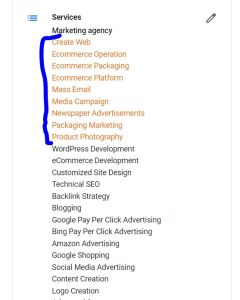
- Services – Whereas your primary and secondary categories are limited to Google’s recommended categories list, the services section allows you to input whatever you’d like. While you can manually add/delete services, Google will scan your site and automatically add services to your GBP. Make sure to monitor and amend the automatically added services as needed.
The Media Captain’s Services list on GBP:
- Hours of operation – This one seems straightforward: just be transparent about the hours you’re open, right? But some businesses say they are open 24/7 since they have an answering service, but this is risky. If a competitor reports you, Google can actually call your office to test if you’re being honest. If Google deems that you’re not being accurate about your hours of operation, your GBP can be dinged.
- Opened on date – This is the date your business was established. It’s NOT the date your business moved into a location. Even if you move or expand into a new location, stick to the date you founded your business.
See our full Google Business Profile Optimization Checklist for more on how to fill out and optimize the Tier 1 and 2 categories of your GBP.
Note: There are other categories, like attributes (e.g., women-owned), and health and safety measures you can fill out if relevant to your business.
3.2 Features & Growth
Things you do with an already-set-up profile.
Once your profile is set up, the work is not over.
To achieve consistent top-3 visibility in the Map Pack, you have to monitor and update your profile with fresh content.
The following items are the ones you should prioritize the most:
- Getting consistent reviews on your Google Business Profile. We’ve mentioned reviews throughout this post, but they need to become part of your core business processes to consistently acquire 5-star reviews. There is arguably no more important trust signal for your GBP than reviews.
Note: Once you get several 5-star reviews, you can embed them on your website so they show up if searchers visit your site before your GBP.
- Update photos at least twice a year. You need fresh photos of the interior/exterior of your office, your staff and services to stand out among competitors. Tip: For a potential small SEO boost, geotag the photos using a tool like GeoImgr.
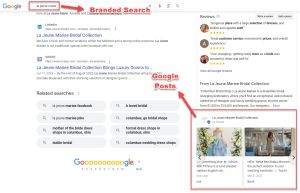
- Post a couple of times a month. There is a “Posts” button on your GBP that allows you to share updates, offers and events from your profile. These aren’t going to affect your rankings directly, but they can drive branded-search engagement.
- Report monthly on your core GBP metrics. Within your profile, you get access to metrics like business profile interactions, calls, messages, bookings, directions and website clicks that give you insights on your profile’s performance. Note: GBP data is limited to a six-month rolling window, so if you want year-over-year comparisons, you will need to manually archive your results.
These action items are all free and require relatively little effort or time to complete once you get the hang of them.
One potential action item that is not free is running Google Ads to rank your profile in the sponsored listing in the Map Pack.

We suggest you check out our full guide on how to run ads on your GBP for the full picture, but it’s an option for businesses lagging behind competitors in the Map Pack rankings and needing to generate immediate visibility while they look to increase their organic rankings.
Callout: Staying on top of reviews, photos, and monthly reporting takes consistent time. If you’d rather hand this off, we manage Google Business Profiles on an ongoing basis for clients. Reach out for a consultation.
3.3 Compliance & Reputation
Protecting and defending the profile.
Ensuring your Google Business Profile is compliant with Google’s Business Profile guidelines is essential to avoid getting reported for inaccurate or misleading claims.
If you follow the advice throughout this post, you should be covered. However, we recommend setting up email notifications from your GBP to route to an email you regularly monitor to keep track of any sudden changes with your profile.
You can also check your GBP metrics: if they are steadily declining, it’s worth looking into further to make sure it’s not a compliance issue.
Beyond compliance, you want to monitor your GBP for reputational harm, including from negative reviews. Legitimate negative reviews will be difficult to remove, but nefarious ones that come from a former employee or a competitor, as examples, should be flagged for removal.
Related: Removing & Flagging Negative Reviews From Google Business Profile
The real opportunity when it comes to compliance, in particular, is researching competitors and reporting any spammy behavior.
This includes keyword stuffing the business name, fake addresses to make it look like a business has a physical location and misleading hours of operation.
How to Report Your Competitors for Being Spammy
There are two primary ways to tattle on your competitors for trying to manipulate the Map Pack rankings:
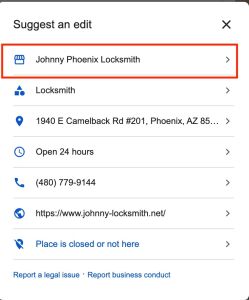
1. Suggest an Edit – Suggesting an edit is the easiest way to notify Google of an illegitimate business name or fake address (although not always the most effective). To do this, find your competitor’s GBP and click “Suggest an edit”.

That will take you to this screen, where you will click on the section where you are suggesting the edit:
From there, you type in what you believe should be the appropriate name:
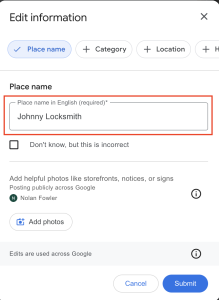
Note: We didn’t actually submit the request shown in the screenshots above. We just used this as an example of how to go through the process.
2. Business Redressal Complaint Form – This is the more comprehensive option when reporting bad actors’ GBPs. It’s more time-consuming, but we’ve found it to be more successful than suggesting an edit.
Here’s a quick summary of how to complete a business redressal complaint form:
Step 1: Access the form (here is the link)
Step 2: Fill out the form. You will note the name of the entity or organization being impacted (your business) and indicate the malicious content (inaccurate business name, address, etc.). Include the public URL for the competitor’s location, if possible.
Step 3: Provide supporting documentation. Any relevant files or documents that support your case, such as a screenshot of another business they claim to be operating from, should be included. You’ll need to explain why you feel the competitor’s content violates Google’s Business Profile guidelines before submitting the form. Once you submit, Google will review the report and take the appropriate action.
GBP Is Your Most Important Local SEO Asset: Treat It As Such
Even with the evolving search landscape, your Google Business Profile is the single most important SEO asset for driving new business from the Map Pack (the most prominent local organic section on Google’s SERP).
Hopefully this Guide gave you everything you need to set up and optimize your profile.