AI search platforms like ChatGPT, Perplexity and Google’s AI Overviews have changed how people find professionals and businesses.
One of the most prominent new developments has been the frequency with which these AI platforms cite LinkedIn as a source.
Most individuals haven’t optimized their profile to rank in these platforms, which could lead to missed visibility and revenue opportunities.
We’ll use our experience as a digital marketing agency offering LinkedIn content creation and advertising to explain how to optimize your LinkedIn profile for AI search visibility so you can be fully prepared for the AI era.
Why LinkedIn Matters for AI Search Now
Semrush recently conducted a study that found LinkedIn ranks #2 in terms of AI citations, according to their dataset, appearing in an average of 11% of citations across ChatGPT, Perplexity and Google’s AI Mode.
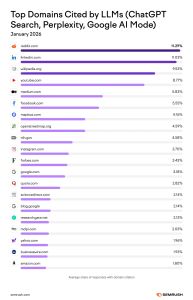
Photo and data courtesy of Semrush.
They also found that ChatGPT Search and Google’s AI Mode cite individual creators more frequently than company pages (59%).
And among professional queries (ex: “who is the best social media specialist in Columbus”), LinkedIn is the most-cited domain, according to Profound.
What this data shows is that AI search has transformed LinkedIn from a job-searching platform into a potential source of growth for your personal career/brand.
This is the case not only for professionals searching for jobs or representing their companies as thought leaders, but also brands trying to promote their products/services (a topic for another day).
To win on LinkedIn, your individual profile must be fully optimized, no matter what you’re using it for.
7 Ways to Optimize Your LinkedIn Profile for AI Search
We’ll spend the rest of this post providing actionable insights to help you enhance your personal LinkedIn profile for AI search without having to guess what will work.
We will use Stefanie Parks’s profile (co-founder of The Media Captain) to illustrate how to optimize for the relevant points below.
1. Make Your Headline More Than Just Your Job Title
Your LinkedIn headline is one of the first things somebody sees when they view your profile, and it’s also one of the most heavily weighted fields search engines and AI platforms use to match your profile to relevant queries.
If you’re just listing your job title, you are missing an opportunity to sell yourself. You have 220 characters for your headline; use them as necessary!
To write a LinkedIn-optimized headline for AI search, use this format as a template:
Practice Area + Geography + Differentiator
This covers your area of expertise, location and a distinguishing feature of yourself, all in one neatly formatted line.
Optimized LinkedIn Headline Example
Here is an example of Stefanie’s current LinkedIn headline:
Current headline: “Co-Founder of The Media Captain | Digital Marketing Agency | SEO, Paid Ads, Organic Social Media, Email Marketing, Web Development, Design | CEO @ DermWarehouse | Partner @ Park Perfection”
While this is a good headline on the surface, there are a few things that could be cleaned up to make it even better. Below is the optimized headline, before we go into what changed:
Optimized headline: Co-Founder, The Media Captain | Digital Marketing Agency | SEO, Paid Ads, Social Media | Columbus, Ohio | 16+ Years Helping Businesses Grow
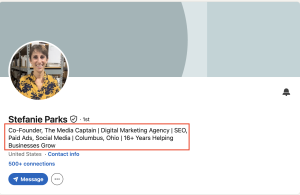
Here’s why the optimized headline is the stronger option:
- It’s more concise and easier to read.
- It lists Stefanie’s primary position only (Co-Founder of The Media Captain) and removes DermWarehouse and Park Perfection. These will both be in the Experience section, but were cluttering the Headline section.
- It adds “Columbus, Ohio” so people/AI search platforms know where Stefanie’s primary business location is.
- It condenses the services to Stefanie’s three main areas of focus (“SEO, Paid Ads and Social Media”).
- It ends with a key differentiator (“16+ Years Helping Businesses Grow”).
Although you have 220 characters to use for your LinkedIn headline, you only want to use what is most prominent and necessary. The rest can go further down the page.
2. Your About Section Should Work for Humans and Machines
Your About section on LinkedIn can be the most wordy place on your LinkedIn page (you get up to 2,600 characters).
The key is you don’t want to get too wordy. AI platforms like clear, concise and structured content. Dense paragraphs can be difficult for answer engines to parse.
Here are a few tips to maximize the About section of your LinkedIn profile:
- Lead with your strongest statement, and make it unique to you. Write something that will intrigue someone to keep reading.
- Include your primary services/skills, the types of companies/industries you work with, location, results you’ve delivered in past jobs, key personal differentiators and a call-to-action at the end.
- Aim for 1,500 characters. Although you can go up to 2,600 characters, you don’t want to fill up the section with fluff. Stick with the most impactful points.
- Space everything out. Each paragraph should be 1-2 sentences long, and bullet points are great for highlighting your key results/outcomes.
Optimized LinkedIn About Us Example
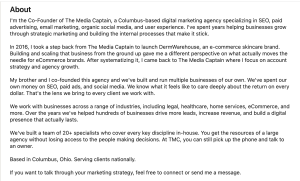
Using Stefanie’s profile as an example, below is what an optimized LinkedIn About Us section looks like.
Notice how it leads with her current role, goes into her professional journey to get to that role, then goes into key differentiators before wrapping up with location and a call-to-action.
3. The Featured Section Is Your Underrated Asset
The LinkedIn Featured section often gets forgotten about.
But it’s valuable real estate that sits right below the About section, making it one of the first things visitors see.
In the Featured section, you can include key information and links like:
- Your website bio
- Past press mentions
- Videos you’ve been a part of
- Articles you’ve written
Linking to these assets not only makes your profile more accessible for your visitors, but it can also help AI crawlers discover and connect your work across the web, strengthening the case for citing you as a credible source.
Optimized LinkedIn Featured Section Example
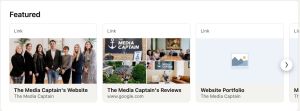
See below for Stefanie’s Featured section. It includes a link to The Media Captain website, Google reviews and a portfolio of websites The Media Captain has built for their clients over the years.
4. Be Selective With Your Skills
The Skills section of LinkedIn is your chance to list all your professional specialties.
While you can add up to 50 skills, you should only add 20-30 skills that you have truly mastered and are related to your core areas of focus. This helps LinkedIn and AI tools match your profile to queries relevant to your skillset.
Skills like “Research” are too broad. “Keyword Research” would be a more defined skill if you’re a digital marketer specializing in SEO services.
Optimized LinkedIn Skills Section Example
Once you finalize your skills list, make sure to pin your top five skills, so they appear at the top of your LinkedIn profile.
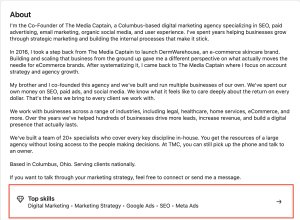
See below for Stefanie’s top skills, located under the About section on her page.
5. Emphasize Depth In Your LinkedIn Posts/Articles
In the Semrush study we cited in the Why LinkedIn Matters for AI Search Now section, they found that long-form articles (500-2,000 words) and mid-length posts (50-299 words) accounted for the largest share of AI citations.
Of the cited posts, 54-64% focused on sharing knowledge or practical advice.
This data shows that AI search platforms favor LinkedIn posts that are thorough and share actionable insights based on your expertise.
We strongly recommend creating LinkedIn articles when optimizing for AI search because they live permanently on your profile and get indexed by search engines just like web pages.
You also want to be consistent with your posting. In that same Semrush study, they found that most LinkedIn AI citations were driven by relevance and consistency, not viral engagement.
If you post even one LinkedIn article a month while mixing in a few thoughtful posts, you can build authority over time.
When creating content, focus on experience-based, opinion-driven content that wouldn’t go on your website. Don’t just use AI to write it, either: make sure you provide a unique perspective.
Since AI became widespread, AI-generated LinkedIn content has increased. Make your post one to remember.
Optimized LinkedIn Post/Article Example
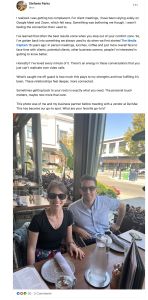
Below is an example of an optimized post from Stefanie’s profile:
This post is optimized for LinkedIn because:
- It meets the mid-length post word count cited in the Semrush study (195 words).
- It shares a personal anecdote with key learnings and insights.
- It ties back to Stefanie’s work with The Media Captain.
- It includes a picture (which will stand out in a feed more than a text-based post).
- It opens the door for further engagement at the end (“What are your favorite go-to’s?”)
6. Make Sure Your Profile Is Public
This last point is simple, yet necessary if you want to set your profile up for AI search. If your profile isn’t public, AI crawlers can’t access it.
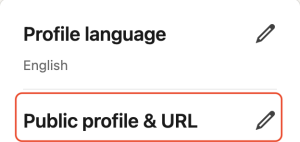
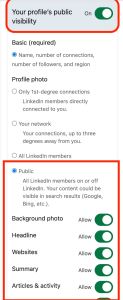
To ensure your profile is public, click on the pencil icon next to “Public profile & URL” in the top right corner of your LinkedIn page:
Then make sure your profile’s public visibility is on. You also want to ensure all of the checkboxes are marked as “Allow” so your background photo, headline, website, etc. are publicly visible.
Additional LinkedIn Tips: Ensure your profile picture is nice, clean and professional, and create a custom banner image with your branding. You can use an AI tool like Google Gemini’s Nano Banana or a design tool like Canva to help with this.
7. Gather Recommendations From Your Colleagues
At some point, you’ve probably used user reviews and testimonials to gauge whether a product or service is worth investing in.
And it’s likely that the products/services with overwhelmingly positive reviews swayed your decision.
The same logic applies to your own personal LinkedIn profile.
LinkedIn has a Recommendations section where you can have your colleagues provide written testimonials vouching for you as a person and professional.
This is invaluable for your reputation and trust because it’s third-party proof of your expertise.
Optimized LinkedIn Recommendations
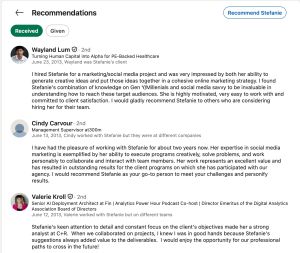
Stefanie’s profile has multiple recommendations from past clients and colleagues (see screenshot below). They each highlight her personal and professional strengths thoroughly.
That said, none have been added since 2013. Reaching out for a few fresh recommendations would help keep this section current and more relevant.
Treat LinkedIn Like a Growth Channel
LinkedIn is no longer just a tool you use for job searching. It has AI search implications that can affect your brand’s visibility and bottom line if you do it right.
The good news is that most LinkedIn profiles are still under-optimized. This presents proactive users the opportunity to stand out in a crowded space.
To recap:
- Optimize your headline so it includes your main area of expertise, location and key differentiator.
- Make every word of your About section count. Don’t waste space on fluff or redundant information.
- Take advantage of the Featured section by including links to your past work and projects.
- Don’t go crazy with your skills selection. Pick 20-30 skills you’ve truly mastered, and cut out any generic skills.
- When writing a post or article, be thoughtful and expand when necessary. AI has been shown to favor depth in its LinkedIn citations.
- Ensure your profile is publicly visible. This is the only way it can be crawled by AI.
Use these tips to enhance your profile so it’s built to thrive in the AI era.
Reach out if you need any professional help creating a personal LinkedIn branding strategy.