Many websites don’t realize that low-quality content is actively holding them back.
This happened to us back in 2020, when our rankings were negatively impacted by a Google Core Update (more on this unfortunate scenario later).
Google’s recent generative AI guidelines reiterate that Google (as well as AI search platforms) value unique, compelling and high-quality content more than ever.
This makes pruning your website to shed the redundant, filler content crucial to succeed in modern search.
In this post, we’ll cover what content pruning for SEO is and the three actions you can take to resolve underperforming pages, providing real client examples to give you a practical view of content pruning in action.
Jason Parks contributed to this post.
What Is Content Pruning for SEO?
Content pruning is the process of auditing your website’s existing content to identify low-quality content.
For a visual, think of your website as a pie chart. If 50% of your content is low-quality or thin and not producing results, Google will take notice and won’t give you a warning before your rankings tank.
This is why you need to proactively prune your content so you don’t get hit by a Google Core Update that is difficult to recover from.
We helped one of our clients, Feazel Roofing, increase leads by more than 100%. A major reason for this was that we pruned content, which led to a major surge in keyword rankings when the Google Core update was on the positive side. We do a deeper dive into content pruning within our SEO Guide for roofers.
Our Guiding Principle
Every piece of content should serve as sales collateral on your website.
If you wouldn’t feel confident sharing a piece of content with a prospective client, then there’s work to be done.
Google’s emphasis on non-commodity content (content that provides unique expertise beyond common knowledge) means that spamming with AI-generated or generic content won’t get it done.
Content pruning can help you remove commodity-based content that serves no purpose in increasing your organic visibility.
Your content should be:
- Original
- Expert written
- Helpful yet easy to digest for a decision maker on the page
How We Learned the Impact of Low-Quality Content (The Hard Way)
Back in 2020, The Media Captain was negatively impacted by a Google Core Update. To see the impact, here’s a screenshot showing all of our primary keywords dropping in rankings.
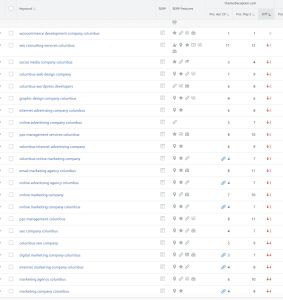
After consulting with Glenn Gabe, he determined that 60% of our content wasn’t topically relevant. Turns out, blogs about Panera’s lobster sandwich and ESPN’s TV coverage were not exactly helping a marketing agency rank.
We’ve written the full recovery story here. The short version? It took 100+ hours and taught us everything in this post.
The Process of Cleansing Your Site
Once we discovered we had been hit by a Google Core Update, we went through a content-pruning process to determine what to enhance, delete, or redirect.
The process is time-consuming. Going back through hundreds of pages took us well beyond 100-hours. Most people aren’t willing to invest this much time and resources in improving the overall quality of the site.
When we were hit by the Google Core Update, we audited every piece of content on our site to determine whether it could serve as sales collateral.
Now, you can add your sitemap into Claude and save yourself a lot of time on the initial research and have a list of pages that you’re ready to tackle [more on this in the step-by-step audit process].
When we work with clients to improve their site quality, we don’t just assign a writer. We identify the true subject-matter expert within their organization and build content based on their expertise.
If you just try to hire someone who isn’t a true expert, you’re putting a Band-Aid on a bullet wound.
Redirect, Delete, or Enhance? The 3 Content Pruning Actions
When you prune your content and find the low-quality page, you have three courses of action:
- Redirect the weak page to a stronger page.
- Delete the weak page altogether.
- Enhance the weak page to be higher-quality.
Let’s run through each of these.
Redirecting Low-Quality Content
You should choose the redirect option when multiple pages compete for the same search intent.
For example, our client, Luxe Redux Bridal, had separate pages for their primary Cincinnati location (pictured below), bridal gown collection, and appointment scheduling. All three of these pages were competing for their target keywords in Cincinnati.

To resolve this, we embedded the scheduling feature on their primary Cincinnati page (pictured below) and improved the overall design of the page.

After that, we redirected the bridal gowns and book appointment pages to the primary Cincinnati page so that it received all the SEO equity for that location’s primary keywords.
This resulted in stronger visibility across all markets for terms like “Cincinnati Bridal Shop.” They were also sending Cincinnati traffic to three separate pages, as each ranked for a core query, and this eliminated the confusion.
Note: If you don’t want to permanently redirect pages just yet, you can use canonical tags (which are snippets of code that tell search engines which version of a page is the primary one) as a temporary measure to signal to search engines that the ranking power should go to the primary page without deleting or redirecting the other pages.
Deleting Low-Quality Content
This option is pretty straightforward. If the content is not up to par or off-topic, you can just delete it altogether.
We had a Columbus bankruptcy lawyer who had several blogs on student loan debt.
To resolve the issue, we found the highest-performing page, redirected the weaker student loan pages to it, and deleted the ones with no SEO value. The deleted pages included topics like their Student Loan Bubble blog and Big Table blog, which were doing nothing substantial for them SEO-wise.
In addition to Claude telling us which pages were most relevant, we looked at Google Analytics to determine that the pages we planned to delete had little traffic and few conversions (a good practice).
Warning: Once you delete a page, that URL loses all SEO equity. Remove the page only once you’ve confirmed it has no SEO value. You can verify whether a page has SEO value by looking at Google Search Console’s clicks, impressions and average ranking position metrics to see how it’s faring. Tools like Semrush can give you more data on organic rankings and AI search visibility if you want an in-depth analysis of a page’s SEO/AEO status.
On The Media Captain’s website, we had a blog about how frequently you should post per day on social media. Yes, we offer social media services, but the blog wasn’t driving any commercial traffic, had an extremely high bounce rate, and drove very few conversions. We felt it was best to delete the page.
Enhancing Low-Quality Content
When a topic is strong, but the content isn’t quite doing it, then it’s a candidate for enhancement or optimization.
Sometimes, this requires doing a complete refresh of the content. In this case, think of yourself writing on the topic as if it were a completely new post. Then, just post it under the same URL, and change the date/author (only do this when the content has been significantly changed).
Other times, you might only need to add smaller content enhancements to make it a quality performer. This can include adding more original insights from your company’s experience, new data/updates and improved visuals.
One of our best-performing blogs in terms of backlinks generated is on Google My Business Stats. After three years of the blog ranking well, it started to slip down the first page of Google.
We decided to take proprietary data from 200+ clients and incorporate those stats as firsthand insight. This is what Google is looking for, and it is an example of enhancing existing content.
Regardless of how extensive your content enhancement is, don’t post it under a new URL. Always keep the same URL when optimizing content, since it has already built up SEO equity.
How to Run a Content Pruning Audit
Now, let’s discuss how to actually run a content pruning audit. We highly recommend utilizing AI to save time. Here are the steps to follow:
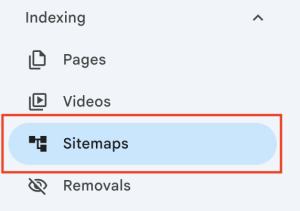
1. Upload your sitemap to Claude. You can grab your sitemap by typing yourdomain.com/sitemap.xml into your browser, or by navigating to Sitemaps under the Indexing section in Google Search Console (pictured below), and copying the sitemap URL listed there. Some sites also have it linked in their footer.
2. Use a prompt like:
Prompt for Claude
Act like you’re a Google Search Quality Rater. I want you to grade each page on my website on a scale of 1-100, with 100 being the highest grade. For the grading mechanism, please take the following into account:
- Showcases authority and expertise
- Serves as strong sales collateral for current or potential clients
- Is topically relevant
- Doesn’t cannibalize or compete with other pages on my site
- Isn’t thin in nature and possesses true depth and value
- Adds true depth and is written for the user and not a search engine
- Is easy to understand and navigate
- Doesn’t come across as generic or fluff, but real insights that a prospect would find valuable.
3. Export Claude’s output to a Google Sheet so your team can collaborate and work through it together.
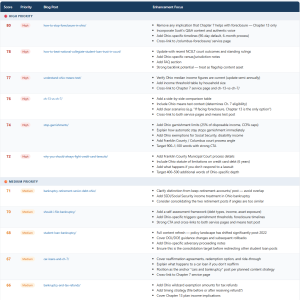
Below is an example of what the Claude output looks like from one of our bankruptcy lawyer clients. Start with the highest priority items, and work your way down.
If you want, you can use a manual approach, where you use a tool like Screaming Frog to run a detailed analysis and go page-by-page to see what content needs to be actioned on.
However, this can literally take hundreds of hours if your site is content-rich.
In our experience, having AI to do the legwork and using human discretion to strategically navigate the action items AI generated has yielded positive results.
The Standard Every Piece of Content Should Meet
Before we wrap up, let’s reiterate the standard you should set for every piece of content on your site.
If you wouldn’t share this piece of content with a prospective client, then take the appropriate action (redirect, delete, enhance) to make it pass that threshold.
Think of the pie chart again: the goal is to have over 80% of your indexed content be genuinely useful.
If that’s not the case, then you’ve got some content pruning to do.
Keep that same principle in mind for all future pages. If you consider it before you hit publish, then you won’t have to extensively prune your website to rid yourself of past mistakes.
If you need assistance pruning your existing content, we’ve helped hundreds of clients of all industries and sizes clean up their sites to succeed in modern search. Reach out for a free consultation, and we’ll discuss what a partnership could look like.