What Is Google PPC
Google PPC stands for Pay-Per-Click. Essentially, this is an auction that allows you to bid on advertising space at the top of Google vs. earning that top placement through SEO (search engine optimization). Here’s how it works: You bid on keywords related to your business, choose a location to target the ads, and pay only when someone clicks on your ad. This is the fastest way to get immediate traffic to your website and get in front of people who are actively searching for what you sell.
PPC ads are priced based on the competitiveness of your industry. For a nail salon that offers $100 manicures and pedicures, the cost per click is going to be much less expensive than a personal injury firm that can yield a million+ dollar case from PPC.
Our Experience
- Our agency, The Media Captain, works with 200+ clients
- We’ve won an eAward by DashThis for Best PPC Campaign (source)
- Sibling co-founders Jason and Stefanie Parks grew their own eCommerce brand, DermWarehouse, past $5MM in revenue using Google Ads. They started with a $500/month test budget and scaled to $60,000+/month in spend based on strong ROAS (source)
- We manage $6.64MM in annual Google Ads spend, with more than 80% of that supporting small to medium-sized businesses
- We’ve run enterprise PPC for SafeAuto, Highlights for Children, and Amedisys. For Amedisys, our “Is Hospice The Answer” quiz drove a 402% lead increase across 530 locations
Real-Life Scenario To Show You The Impact of PPC
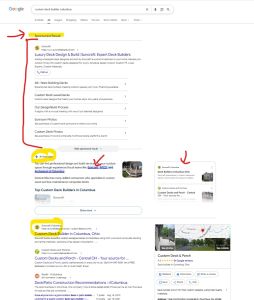
A client of ours, Suncraft, builds custom sunrooms, decks, patios, and more. As you can see in the screenshot below, they are ranking great organically for one of their key terms, “custom deck builder Columbus.”
Even with top placement in the AI overview and organic results, their PPC ad takes the top billing and fills all the space above the fold. As a result, Suncraft owns the first page for this important term.
If we weren’t running ads and someone else had this coveted spot, Suncraft would lose out on this prominent exposure on Google, even though they’re ranking well.
One custom deck job can bring in thousands of dollars for Suncraft, so every lead coming through is extremely valuable.
Interested in running PPC campaigns for your business? Learn More
Types of Google Ads Campaigns
Search
Search campaigns are the classic campaign you think of when you see ads on Google. These text ads show above (and sometimes below) organic search results when someone types something into Google. These ads work well to drive traffic and leads because they match the searcher’s intent.
In the screenshot below, I searched for “best dentist Westerville Ohio,” and you can see the results that populated at the top of Google are sponsored search ads. It pays to run ads for this term because someone typing this is looking for a dentist, so their intent is high.
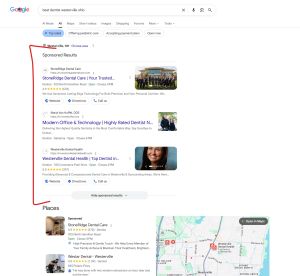
Note: Google now groups search ads under a single overarching “Sponsored results” header rather than labeling individual listings, making paid ads look nearly identical to organic search results.
Display
Display campaigns show visual banner ads across websites and apps in Google’s display network (there are millions of them), plus Gmail. Whereas search is based on someone actively searching, Display is based on browsing behaviors, interests, or retargeting. We tend to use display mainly for retargeting vs. driving new business.
One thing to watch out for with display. Google automatically turns on “audience expansion” for retargeting campaigns, which lets Google find audiences similar to the people who visited your website. If you’re noticing that your impressions don’t look right in your retargeting campaign, this is likely the culprit. More on this and instructions on how to turn this setting off in our blog about reducing clicks in display retargeting campaigns.
Shopping
Shopping campaigns pull from a product feed in Google Merchant Center. These are visual ads that show product images, prices, product reviews, and your store’s name directly in Google’s search results. For DermWarehouse, our in-house eCommerce brand, Shopping campaigns are among our best performers because they pull in product photos and prices, so people can compare options directly on Google. If you’re an eCommerce business, you should be utilizing Shopping ads.
In the image below, the Shopping ad for DermWarehouse stands out because it’s the only ad that includes reviews.

Video
Video campaigns run ads on YouTube and across Google’s video partners. Video works well for building awareness and reaching people earlier in their buying journey, before they’re actively searching.
Performance Max
Performance Max lets Google’s AI run your ads across Search, Display, YouTube, and Gmail from one campaign.
Unlike standard PPC, you’re not picking keywords. Instead, you provide creative assets, conversion goals, and audience signals.
For example, for our marketing agency, we could leverage the following:
- Our own data:
- Upload customer list
- Leverage website visitors (remarketing).
- Custom Intent Segments:
- Target phrases we want people to search for, such as “Best B2B Marketing Agency” or “Marketing Agency Certified Google Partner.”
- Competitor websites
- Google’s Interests & Demographics (In-Market Audiences)
- Users Google has flagged as currently in the market for “SEO & SEM Services,” “Advertising & Marketing Services,” or “Email Marketing Services.”
- Targeting specific company sizes or industries, such as “Company Size: 11-50 employees” or “Industry: Technology.”
One tip for using Performance Max campaigns is to exclude your brand name from the campaign. Since you don’t have as much transparency into what’s converting with these campaigns, it’s easy for the campaign to look like it’s performing great when, in reality, the conversions coming in are for your brand name and are skewing the results.
Dynamic Search Ads & AI Max for Search
Dynamic Search Ads have been replaced by AI Max for Search.
When creating a standard PPC campaign, there is a button you turn on to “Optimize your campaign with AI Max.”
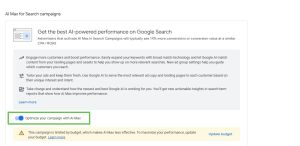
AI Max for Search sticks with search ads, whereas Performance Max goes across search, display, YouTube, and Gmail.
In our experience, it broadens out the keywords you’re bidding on within standard PPC.
PPC Campaign Setup and Structure
When it comes to PPC, setting up your first campaign is pretty simple, and Google will guide you through the steps within the Google Ads platform. However, choosing the right structure matters because it affects how Google optimizes and shows your campaigns.
Simple PPC Campaign Structure
In a simple PPC campaign, you’ll have a theme that your campaign centers around. Within that campaign, you’ll create one or more ad groups, each focused on a specific, related set of keywords. From there, you’ll choose keywords to bid on that are relevant to that ad group’s focus. You’ll create ad copy that matches what people search for and entices them to click. You’ll choose a daily budget for the campaign, so Google understands how much you’re willing to spend.
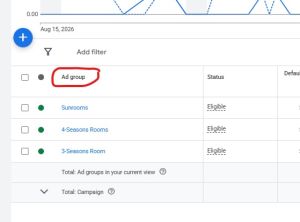
For Suncraft, we would set up separate campaigns for sunrooms, decks, patios, and more. The sunroom campaign might have different ad groups for sunrooms, 3-season rooms, and 4-season rooms. We do this to keep similar keywords together and focus the ad copy on those specific keywords. This makes the ads more relevant and higher quality, increasing the likelihood that Google will show them.
Here are the ad groups.
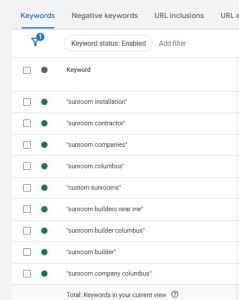
Here’s an example of the keywords we’re bidding on in just the sunroom ad group. You can see how closely all of these are related to sunrooms and don’t bleed into the other areas:
For The Media Captain, we might have a campaign for SEO, paid advertising, or email marketing. For our paid advertising campaign, we might have an ad group for Google PPC and Google Shopping.
To give you a benchmark, it’s a good rule of thumb to keep each ad group under 10 keywords. Make sure your ad groups don’t overlap and compete with each other for the same auctions.
Bidding Strategies
Your bidding strategy tells Google how to optimize your bid and what your core focus is for the campaign. You can choose to focus on clicks, conversions, conversion value, a target cost per acquisition, or a target position on the page.
Common bidding strategies include:
- Maximize Clicks
- Maximize Conversions
- Maximize Conversion Value
- Target CPA
- Target ROAS
- Manual CPC
- Target Impression Share
Manual CPC is the only bidding strategy on this list that isn’t fully automated. It gives you full control over what you pay per click, which can help when a campaign has little conversion data or a tight budget.
The best practice is to start with the Maximize Clicks bidding strategy until conversion data starts coming in. Once you have this data, Google can better optimize the campaign based on your goal. We typically start with Maximize Clicks and then move to Maximize Conversions once we have conversion data to optimize for.
Picking the Best Keywords for PPC
Keyword selection can make or break your campaign, so you need to be intentional about this. The goal here is intent vs. volume. Make sure your keywords have buying intent and are specific to your business so you get clicks on your ads from customers who are actually interested in what you’re selling.
Start with your actual services or products. Add location and near me phrases to the keywords. Make sure the keywords you choose match how customers actually search, not how you talk about your services internally. Use Google Ads Keyword Planner or other keyword tools like SEMrush to make sure you’re on track.
Make sure you check your search terms frequently, especially in the beginning, to identify any keyword mismatches. Adding negative keywords matters just as much as the ones you’re bidding on since these ensure you aren’t wasting money on irrelevant searches.
Later we’ll get into the different match types you can select for your keywords.
Bidding on Branded Keywords
A lot of our clients ask us whether they should bid on their own brand name. The answer is that it depends. If you type your own brand into Google and see that your business is the only one populating, you likely don’t need to spend money on your brand name since your customers will find you regardless.
If you type your brand name and others are showing up and it’s important to dominate these searches, then it makes sense. For our eCommerce brand, DermWarehouse, we bid on our brand name because customers often mistake us for a competitor, Dermstore. We want to make sure that if a customer is searching for us, they find us.
Setting Up a Google Ads Payment Profile
Before you can launch any of your ads, you need to set up your payment profile with your business info, billing address, tax details and payment information. This is a quick step, but it’s important, as any issues with the payment profile can delay your launch or put your account on hold.
Only admin users can make changes to the payment profile, so make sure you have an admin associated who’s not going anywhere within your company. Adding and changing payment methods is much easier than coordinating the setup of a new payment profile altogether.
Choosing the Right Match Types
A match type on Google is used when selecting your keywords. You select a match type for each keyword and this controls how closely someone’s actual search has to match the keyword in order for Google to show your ad. The match type determines how wide or narrow the net is on each keyword within your campaign. The match types below go from widest reach and least control to narrowest reach and most control.
Broad Match:
Broad match keywords have the widest reach and the least control. Essentially, broad match keywords will pull in any search terms Google thinks are related to your keyword, even loosely.
Use broad match if you want to show your ad for any term closely related to your keyword or if you have a niche business with low search volume. If you’re using broad match keywords, make sure you bid on longer-tailed phrases (3 words or more) to keep the search terms more relevant.
Google pushes advertisers to broad match keywords pretty aggressively, because it can drive a lower cost per click and show for some great long-tail searches that you wouldn’t ever bid on specifically. The issue with broad match is that it can also bring in irrelevant clicks fast if you’re not watching it.
For example, if we were bidding on the keyword Best SEO Company Columbus for The Media Captain, we may see search terms like “top SEO agency Columbus,” “affordable SEO company near me,” “How to rank higher on Google Columbus,” or even “SEO courses online.”
We’d want to make sure we were monitoring our search terms closely and add “SEO courses online” as a negative keyword since this isn’t relevant to what we offer.
Phrase Match:
Phrase match is the middle ground between broad and exact match. This match type, which is written with quotes around the keyword (like “best SEO company Columbus”), tells Google to show your ad for searches that include your keyword phrase or that match the meaning of the phrase match keyword. The search terms that Google matches with phrase match could lack the phrase’s actual terms entirely if Google feels that it’s a match.
For example, if we were bidding on “Best SEO Company Columbus,” someone searching for “The Media Captain” could see our ad based on this term.
Phrase match gives you more control over your search terms than broad match, but still allows for more flexibility than exact match. As the example above shows, you still need to watch your search terms closely to make sure they are relevant.
Phrase is our match type of choice and what we typically start our campaigns with.
Exact Match:
Exact match keywords have the narrowest reach and the most control. Using this match type, your ad will only show for searches that exactly match your keywords’ meaning without adding extra words that change what someone is looking for.
You show exact match by using brackets around the phrase, like [Best SEO Company Columbus]. This keyword would show only for that exact phrase and very close variations, but not for “SEO agency near me.”
Exact match gives you very tight control over your keywords and usually the highest quality traffic, but can also limit your reach. You may find that in using exact match you’re not meeting your budget if there’s not enough volume for your exact keyword.
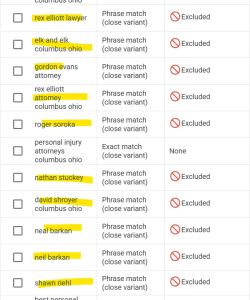
For a personal injury client we work with, we were bidding on the phrase match keyword “personal injury attorney Columbus.” This was pulling in searches for a lot of competitor law firms and attorneys in the area, which we didn’t want. In this instance, we changed the phrase match keyword to exact match, and this greatly increased the quality of our search terms. Since this is a very competitive keyword, there’s plenty of search volume and this allowed our budget for this exact term to go a lot further.
You can see in the screenshot below that we excluded all of the attorney names that were pulling into our campaign before we changed the keywords to exact match. Before the change, search term quality was consistently below 60%. Now it’s close to 100% each time we check.
Nailing Your Ad Copy & Extensions
How to Structure Your Ad Copy
When you’re creating ad copy for your campaigns, Google allows you to have up to 15 headlines (up to 30 characters each) and 4 descriptions (90 characters each). This makes up the meat and potatoes of your ad.
It’s important to make sure your ad copy aligns with the keywords you’re bidding on, as this impacts your quality score (more on this below) and the likelihood that someone will click on you
If someone is typing a phrase into Google, the ad copy should speak to what they’re looking for. After all, this is what will give them a reason to click on your ad over a competitor’s. Not only that, keywords aligning with ad copy enhance the ad’s quality score (more on this below).
Related Article: Should You Add Pricing To Your PPC Ad Copy?
In the example below, you’ll see the ad copy for BB Aesthetic, a medspa in Columbus. This campaign is bidding on keywords for Med Spa Westerville (the suburb where they’re located) and Med Spa Columbus (the larger city). As you can see, we incorporate keywords into the ad copy that align with those two keywords.
It’s also important to include unique selling propositions about the business within the ad copy. Remember, keywords are great, but the ad copy still needs to be appealing enough to make someone want to click.
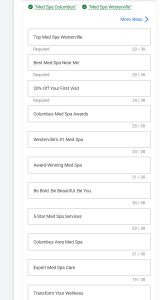
Here is what this ad looks like on Google. Google will rotate between the 15 headlines you select and the descriptions to pull together the ad that shows on the platform.
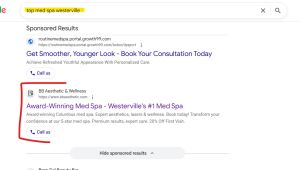
When someone is searching for “top med spa westerville” and they see an ad referencing an award-winning med spa and the #1 med spa in Westerville, it’s clear this patient has found what they’re looking for.
The best practice for thinking about how to write headlines vs. descriptions is as follows: Focus your headlines on keywords and creating more urgency. Descriptions can be longer so they can get more into the unique selling proposition and more personality about the business.
Extensions
Extensions add more real estate and information to your ad. Think of these like call-outs that you can add on to your smaller ad. Google shows them when it thinks they’re relevant or when you’re in one of the top positions, and they typically improve overall click-through rate.
Extensions can be created either at the account level or the campaign level. Creating them at the account level tends to save time because you create them once and they are used for all campaigns. However, if you want to get really specific for each individual campaign, these can be added at the campaign level too.
Sitelink Extensions
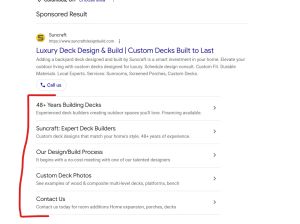
Sitelinks take people to specific pages on your site other than your homepage. You can have a 25-character headline, plus a 35-character description that drives viewers to other pages on your site that are either related or give more background. It’s great real estate you want to take advantage of. They don’t always populate, but when they do, they add valuable real estate you want to use.
Going back to the Suncraft example from earlier, you can see what great real estate the site link extensions add to this ad.
Callout Extensions
Callouts are short, non-clickable phrases that show up next to your ad, and can mention things like “Free Consultation,” “Locally Owned,” or “5-Star Rated.” They don’t link anywhere; they just give potential customers more information about your business and can often add legitimacy.
Image Extensions
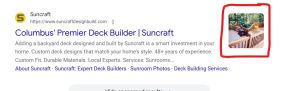
Image extensions do exactly as the name describes. They allow you to add a photo next to your ad. This is a great chance to showcase a little more personality rather than just trying to capture attention with text.
Call Extensions
Call extensions add your phone number directly to the ad, and on mobile, this becomes a tap-to-call button right in the search results. We use these during business hours specifically for clients where a phone call is the primary conversion action; this removes a step between someone seeing your ad and reaching you.
And More…
The list of extension types goes on. Most businesses won’t need all of them, but adding what makes sense only helps overall click-through rate on your ads.
- Structured Snippets
- Lead Form Extensions
- Location Extensions
- Price Extensions
- Promotion Extensions
NOTE: You should always make sure to add your business name and business logo account-wide. This ensures that it’s clear who the ads are coming from.

Conversion Tracking
Conversion tracking tells Google what counts as a win for your campaign. This could be a phone call, a form fill, or a completed purchase (to name a few). Not only does tracking conversions give you a sense of how your campaign is performing, but it also gives Google’s automated bidding strategies something to optimize the campaign for. Conversion tracking measures what all of your clicks and money spent on your ad campaigns actually turned into.
This is arguably the most important element of your ad campaign to get right because it ensures you’re spending your money properly.
What to Track
The conversion actions you track should match how your business actually generates leads or sales. Think of what the most important ways that business comes in on your website, and this will guide you in the right direction as to what Google Ads conversions you should track.
Common conversions include:
- Form submissions
- Phone calls
- Live chat
- Appointment or booking confirmations
- eCommerce purchases
There are other less meaningful conversions you can track, such as email clicks (someone clicking on an email link on your site) or page views. If you have an agency managing your PPC campaigns, tracking conversions like this can inflate the metrics and make it look like you’re getting a ton of conversions, when in reality the conversions aren’t very meaningful and don’t accurately measure actual leads coming in through your ads.
Related Article: Properly Import Conversions from Google Analytics 4 (GA4) into Google Ads
An attorney client came to us to audit his PPC campaigns. He was spending $60k per month on his Google Ads, and while his monthly reporting from his agency made it look like his campaigns were performing well, in reality, they weren’t tracking form submissions or phone calls properly.
Primary vs. Secondary Conversions
Google Ads lets you choose whether each conversion action is primary or secondary. The primary conversions are what your bidding strategy actually optimizes for. The secondary conversions are there for your own visibility. These are conversions that still get tracked, but the campaigns aren’t optimized for these.
For an eCommerce company, for example, you may want to see how many people filled out a form submission or made a phone call, but these should be tracked as secondary conversions. The only conversion you would want as primary would be the eCommerce purchase.
Conversion Values
You can also assign a conversion value to each of your conversions. This is helpful because it allows you to essentially place a weight on the value of the conversion. There are two ways to go about this. The first way is to assign an actual value. The second way is to assign a value just based on weight.
NOTE: For eCommerce businesses, you will be able to see the actual value of each conversion (the purchase), so it most accurately reflects your return on ad spend.
Actual value example: For Media Captain, let’s say our average website costs $10,000. If we know that when someone submits a contact form, chances are it’s someone wanting a new project and we estimate that we’re 50% likely to close that deal, the value of that conversion would be $5,000. When a phone call comes in, on the other hand, it’s often from a current client, so it’s not as likely to be a new lead. Let’s say we feel that we have a 25% chance of closing that deal. We would assign the value of $2,500. This is helpful because Google will weight form submissions higher than phone calls when optimizing our campaign, but also because we’ll be able to gauge the actual return on ad spend (though we’ll need to take it with a grain of salt).
Value based on weight example: In the same example, if we know we are twice as likely to get new business from a contact form vs. a phone call, we can assign a value of 10 to a form submission and 5 to a phone call. This still tells Google to weight the form submission higher when optimizing our campaign.
Call Tracking
Phone calls are hard to track accurately since you don’t have all of the information that you get from a form submission. We use CallRail to solve this. This assigns tracking phone numbers so we can tie a phone call back to the specific campaign, ad, and keyword that generated it. You can even assign a value to each of your conversions so you can start to understand the actual profitability of the campaigns. This helps guide our decision-making for where we’re spending budget. CallRail also has the ability to track form submissions.
Optimization & Performance
Once your campaign is live, your job is just beginning. Now it’s time to optimize performance and make sure you’re getting the most bang for your buck. To understand performance, you also need to know which metrics you’re actually watching and what they mean for your campaign.
Key Metrics to Track
- Impressions: The number of times your ad was shown, whether or not anyone clicked. While impressions won’t necessarily tell you how your campaign is performing, you do want to pay attention to whether your campaign is getting impressions and spending money. In this case, it could mean the budget or bids are too low, the keyword match type is too narrow, or overall there isn’t volume for the searches you’re trying to capture. On the other hand, you also want to pay attention to a campaign getting a lot of impressions but a low click-through rate.
- Click Through Rate (CTR): This is the total impressions that result in a click (clicks divided by impressions). If you have a low CTR, make sure your ad copy is compelling enough and matches what people are searching.
- Cost per conversion: This is the total spend divided by the number of conversions. This is what you’re actually paying for each lead or customer.
- Cost Per Click (CPC): What you are actually paying for each click, before it converts to anything. This is predicated based on competitiveness of a keyword. Using my example from the beginning, the CPC for a nail salon where the average service is $100 is going to be much lower than the average CPC of a personal injury attorney with potential to earn millions on a case.
- Conversion rate: The percentage of clicks that turn into a conversion (conversions divided by clicks). If you have a low conversion rate, it usually points to a mismatch somewhere. Start analyzing the keywords, ad copy, and landing pages because something might not be delivering what was expected. Our benchmark is a 5% conversion rate for our clients.
- Conversion value: This is the dollar value you’re getting from each conversion. This is most applicable to eCommerce businesses, but if you’ve assigned a dollar value as discussed above, this will also be meaningful.
- Return on ad spend (ROAS): This is the conversion value divided by cost. This will tell you for every dollar you spend, how much you’re making in return. It’s the metric that tells you whether a campaign, or even a single search term, is actually profitable. Again, this is easiest to track and most accurate for eCommerce businesses.
- For return on ad spend, make sure you are taking your margins into account. Our typical benchmark is a 3:1 ROAS, but we always ask clients about their margins to ensure this makes sense. ROAS does not always equal ROI.
Quality Score
Quality Score is a rating on a scale of 1-10 that Google gives every keyword. This shows the relevance and usefulness of the ad based on the keywords you’re bidding on, compared to other people advertising for the same term. A higher Quality Score usually means a lower cost per click and a better chance of showing up in top placements. Google rewards advertisers with high Quality Scores.
To get a high Quality Score, make sure your keywords match your ad copy and relate to the landing page. Landing page experience is often overlooked because it needs to be optimized outside the Google Ads platform, but it plays a huge role in overall Quality Score. A subpar landing page that doesn’t match the ad copy or include the information the customer is looking for will drag your Quality Score down.
Search Terms
One of the most overlooked, yet easiest and most important ways to save money within your campaign is the search terms. Not to be confused with your keywords, these are completely different things.
- A keyword is the word you bid on.
- A search term is the actual phrase someone types into Google to then see and click on your ad.
Because Google shows your ad for search terms that are sometimes only loosely related to the keyword you’re bidding on (depending on the match type you select), you will waste money on irrelevant searches if you aren’t paying close attention.
As you’re monitoring your search terms, you can exclude any irrelevant searches so that you don’t pay to show up for those terms. You can exclude search terms directly in each campaign or at the account level, using a negative keyword list.
I’ll reference an example used above in this article for a personal injury attorney. In our campaign, people were clicking on our ad after searching for individual attorney names based on our keyword “personal injury attorney columbus.” We added all of these attorneys as negative keywords, but also changed the match type on this ad to exact. Since making this change, our search term quality has been close to 100%.
Impression Share
Impression share is the percentage of impressions your ad received divided by the total number it could have received. If an ad has an impression share of 80%, this means that out of 100 possible impressions, your ad is showing up 80% of the time.
If impression share is low, the best place to start looking is your budget. Do you have enough budget in the campaign or is the maximum cost per click high enough?
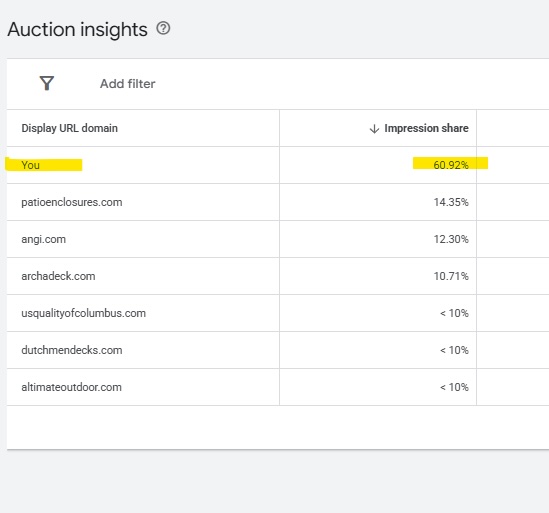
Within your account’s insights, you can also look at the “Auction Insights,” which shows your impression share vs. your competitors. This is really helpful information in understanding how you show up for the keywords you’re bidding on vs. your competition. It also sheds a lot of light on who you’re actually competing against. To see why you’re missing impressions, add the Search Lost IS (Budget) and Search Lost IS (Rank) columns to your campaign view. These tell you directly whether you’re losing impressions because of budget or to bids and Quality Score that aren’t competitive enough.
Suncraft is a good example. What matters most to them is showing up front and center for all of their key terms, and Auction Insights shows we are. Their impression share is well ahead of every competitor bidding on the same terms, which is why they consistently show up at the top of Google.
Bid Adjustments
Google lets you increase or decrease your bids based on where someone is searching from, their demographics, what device they’re on, and time of day. What this means is that you can bid up and down based on certain criteria. For example, you can bid higher during business hours vs. in the evenings and on the weekends. We have clients who only answer the phones during the day, and therefore don’t want their ads running outside of business hours. The ability to adjust bids based on certain criteria gives you a lot of flexibility and options in making sure your ads are targeting the right people at the right time in the right place.
Adjusting bids based on device can have a huge impact and many people don’t know it’s possible. An eCommerce business or something like a restaurant or hair stylist often sees mobile convert better than desktop. On the other hand, a service that requires a long form to fill out or a higher ticket price may be more likely to convert on desktop. You can view your performance across all devices and see what’s performing best and then adjust bids accordingly.
The neat thing here is that you can let the data speak for itself rather than making assumptions. You can review your performance and adjust bids where conversion rates are strong and down (or off) when they’re weak. This is an easy way to stretch your budget.
Cross-Channel Strategy
You can leverage your PPC data and ads across multiple platforms. You’re already spending money driving traffic to your website, but here are some ways to ensure you’re getting the most bang for your buck.
Organic vs. Paid Search
Whenever clients ask us whether to focus on organic vs. paid search, the answer is usually both. The way we explain it is that SEO and organic search is a long-term play. For Media Captain, we’re still working on our SEO now just as much as we were back in 2010 when we opened our doors. While you’re building up your domain authority, paid search and Google Ads are the best way to drive traffic to your website. Organic is earned media. This is going to be your most profitable way to get new business because you aren’t paying per click, but earning that placement is going to take time. While you do have to pay to run Google Ads, the beauty is that you can set up a campaign and get a lead that very day. A strategy that combines SEO and paid ads helps you own as much of the real estate on the first page of Google as possible.
Sharing the screenshot again from our client Suncraft, who owns the first page of Google between paid ads and organic placements.
Leveraging PPC Data for SEO
Don’t keep your PPC data and SEO strategy siloed. If you pay close attention to your Google Ads search terms, this will provide you with valuable information for your SEO efforts.
For a personal injury attorney client of ours, a big focus of theirs is trucking accidents. Within our Google Ads campaign for trucking, we noticed that a lot of the searches mentioned 18-wheelers, though we made no mention of this on their practice area page. Once we updated the page, we began ranking #1 for these terms. This was a big win that wouldn’t have been possible without using our PPC data!
Import Your Google Ads Campaigns Into Bing
Bing makes it really easy to import your entire campaign setup over from Google. After you’ve spent the time getting everything set up once, you can launch the exact campaigns on Bing with only a few button clicks. We’ve found that Bing’s average cost tends to be lower since there’s less competition. If you have a campaign that’s performing well, it’s worth testing this out.
How to Keep PPC Strategy Winning AI Overviews
Google’s AI Overviews are showing up at the top of search results more often than ever. Ads are starting to appear inside the AI Overviews as well, but this is still a new space for advertising. We tested 10 different searches ourselves, including personal injury and marketing agency searches, specifically looking for ads inside AI Overviews. We found zero. That doesn’t mean it’s not happening, but it’s still emerging.
For now: Don’t focus your PPC strategy on chasing AI overview placement. Keep your existing campaigns active and well-optimized and stay tuned as more happens in this arena.
Agency Ops & FAQ
Should You Include Pricing in Your PPC Ad Copy?
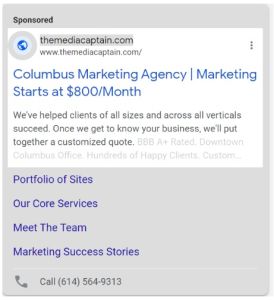
If you have pricing that you can share, then we say yes to this, and we practice what we preach. We included ad copy in our own ads that states “Marketing Starts at $800/Month.” The goal with this is that people will only click on your ads if they can afford your services. It’s better to be transparent up front, which will improve click-through rate and lead quality.
Read our full breakdown of pricing in PPC ad copy →
What to Ask Before Hiring a PPC Agency or Specialist
Whether you’re hiring an agency or an in-house person to run your ad campaigns, bringing someone in to manage your paid search is a big decision that shouldn’t be taken lightly. Especially if you’re not a PPC expert yourself, it’s important to ask the right questions to ensure you’re making the right hire. This is why we put together a list of 50 questions you can ask.
Read our full list of 50 PPC interview questions →
PPC Management Checklist
We put together a checklist to ensure you’re checking all the boxes when managing your PPC campaigns. Our checklist covers budget, search terms, negative keywords, conversion trends, and more.
View our full PPC management checklist →
Closing
This article walks you through all of the steps needed to set up and run a successful Google Ads campaign. The intention is that within this blog, you have all the key pieces of information, with other resources linked for reference.
We’ve spent 16+ years running Google Ads campaigns. If you need help getting started or optimizing what you already have in place, read more about our Google Ads services or contact our team.