When we launched DermWarehouse, a skincare retailer carrying 60+ physician-strength brands, in 2015, we were basically running everything out of Google Sheets. While this didn’t cost us anything monetarily, it took an enormous amount of time and wasn’t efficient.
Over the years, we gradually started adding additional software as we needed it. As issues came up with the business, we found software to solve them.
Over a 5-year span, we found software to help in every area of the business. As the owner, I went from spending every waking hour managing orders, inventory, and customers, to having a business that runs itself.
The software we added allowed me to create processes that were easily trainable so when we hired employees, this wasn’t a big lift.
I went from spending 70-80 hours per week running DermWarehouse to less than 10 hours per week. To say adding the right software has been a game-changer is an understatement.
We want to share our firsthand experience (and mistakes) with you, so your eCommerce business can be a well-oiled machine right from the start.
What makes this list different from most “best eCommerce tools” roundups is that we actually use all of these.
In addition to running DermWarehouse, we also founded The Media Captain in 2010, a digital marketing agency serving businesses across all verticals, including eCommerce.
This has given us a unique perspective on what it actually takes to run and grow an eCommerce business, both as owners and as marketers.
This post is for any eCommerce owner, whether you’re just starting or you’ve been at it for years.
Note on pricing: We’re on higher-tier packages for most of these based on our business size. We don’t want to anchor you to numbers that don’t apply to you, so we’ve linked to the pricing page for each tool. The short version: pricing scales with your business size, and most of these tools have options for businesses at different stages.
The Order We Added Our Software (and Why It Matters)
We didn’t build this eCommerce stack overnight, and your business will undoubtedly go through a trial-and-error process when choosing software.
Here’s the order we added these tools as specific needs came up:
- WooCommerce
- GoDaddy
- Pressable
- WooPayments
- ShipStation
- Finale
- Trustpilot
- FreshDesk
- Avalara
- Klaviyo
- Kount
- Ready Returns
- Route
For example, when we started getting a lot of fraudulent orders, we added Kount.
When we hired more employees and needed to centralize customer service and ensure consistent communication, we chose FreshDesk.
We spent about a year trying to figure out sales tax on my own before finally adding Avalara. If we could go back, we would have added it sooner.
The pattern was always the same: a problem came up, so we found the software that solved it.
The reason we didn’t have everything from the start was cost. If budget isn’t a constraint, don’t make the same mistakes we did!
Tip: If you are tight on money, map out where you’re losing the most time or money and start with the tool that solves that first. You don’t need everything at once.
The Essential eCommerce Software Stack
Below, we will break down our software for the following areas of our business:
- Website foundation
- Operations and fulfillment
- Customer experience
- Risk and compliance
- Marketing
Website Foundation eCommerce Stack
WooCommerce (Website Platform) – We chose WooCommerce for its ability to make customizations. We have a lot of custom functionality built into the site and WooCommerce lets us pretty much customize anything we want. It’s also open source, so anybody can work on it to develop custom plugins.
*Every tool in our stack integrates with WooCommerce. When you’re evaluating any eCommerce software, make sure it plays nicely with your website platform first.
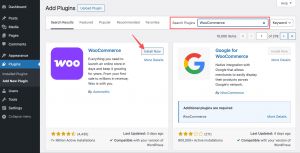
Here’s where you can find WooCommerce within your WordPress Dashboard (courtesy of WooCommerce):
Pressable (Website Hosting) – We recently switched to Pressable after almost 10 years of using WP Engine. The cost was significantly cheaper (we’ve saved over $1,000/month), and the speed has improved since we switched. WP Engine has excellent support, but we haven’t felt that this aspect was lacking with Pressable.
GoDaddy (Domain) – Our website domain is through GoDaddy, which is pretty standard.
Woo Payments (Payment Processor) – We used Braintree and PayPal for many years, but the service wasn’t great. When we were building our new website, Woo Payments (which is through WooCommerce) was amazing in helping us transition, especially with our subscriptions. We tried to enlist BrainTree’s help with the subscription migration, and this was not something they were able to offer, so we switched.
Operations and Fulfillment eCommerce Stack
ShipStation (Shipping) – Add this on day one. ShipStation was the first software we got as part of our eCommerce business. It is very intuitive, allowing us to sync to the back end of our website. It pulls in all of the orders, and we are able to ship them out. It syncs with all of our shipping carriers, including UPS, USPS, and FedEx.
In the photo below, you can see on hold vs. awaiting shipment (both circled in red on the top left corner).
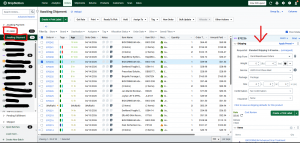
Awaiting shipment are orders for which we have all of the items to ship. On hold means that we don’t have something in our inventory. We are able to split the order if we want to send it out.
This information is passed from Finale. On the right in the image above (see the red arrow), you can see the order information. This is where you choose the package type, carrier, etc.
Once an order is shipped, the tracking number is saved in the order for future reference, and it moves into the “shipped” area.
Finale (Inventory Management) – Add this early if you carry a lot of products or if you place orders with multiple vendors. Once we added Finale, ShipStation’s capabilities expanded.
One of the most important things in your eCommerce stack is making sure your inventory management and shipping software sync up.
With Finale, we were able to see what we had on hand, what was on hold and what we needed to order.
Before this, our inventory numbers were always off (because I was keeping track of them in a Google sheet – lots of human error here), and it took forever to keep track of everything. If you sell a lot of products, don’t wait on this one.
Finale also gives us great reporting, allows us to create purchase orders for our vendors, tracks when purchase orders are coming in, and we set up reorder formulas so the software tells us when and how much to order. No more going to the shelf thinking something is in stock, only to be surprised when we don’t have it on hand.
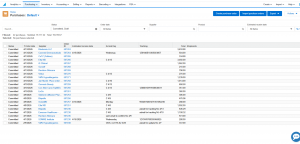
This image shows our outstanding purchase orders. We’ve been able to add notes to show the tracking number and the expected arrival day for our team to use.
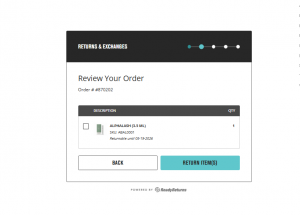
Ready Returns (Returns Processing) – Ready Returns automates the return process. When we first started, any return required a customer to call or email our office and we had to process it through ShipStation manually.
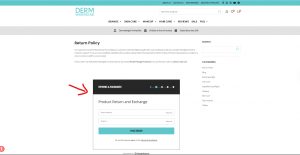
With Ready Returns, customers can enter their order number and name and process the return on their own. This has significantly decreased our customer service time on returns.
You can set up rules for shipping, payment, and how all of your returns work.
For us, we charge for return shipping if the customer wants a refund back to their original credit card, but if they want store credit, we allow them to ship back for free.
You can set rules around return windows, product condition, and customers have to answer qualifying questions. Customers can even upload images of the products before sending them back.
This widget on our site allows customers to go through the entire return process without ever talking to someone from our team:
Customer Experience
FreshDesk (Customer Service) – FreshDesk has been transformational for us. We added it after we hired more employees and needed to centralize our customer service communication and make sure our messaging was consistent.
It keeps everything in one place rather than in individual email inboxes. If you have a large customer service team, you can set up a round-robin system to flow inquiries to different people.
The biggest thing for us was the ability to set up canned responses and templates. We essentially have a template for every possible customer service scenario, so our team knows exactly what to say.
These templates were written in my words, so I could feel confident about the messaging going out to customers. With FreshDesk, nothing gets lost. You can also sync emails from different inboxes into one place.
Trustpilot (Reviews) – Add this early. Trustpilot was one of the first pieces of software we implemented, and it really helped legitimize our business.
It was a significant investment at the time, but to earn customers’ trust, we needed to get eCommerce reviews.
Trustpilot is an authorized partner of Google, so once you reach a certain number of reviews, they populate on Google, which was also big when running our Google Shopping Ads.
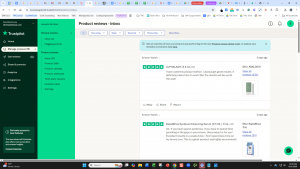
We chose Trustpilot specifically because it allows us to collect both company reviews and product reviews. Many platforms only allow one or the other.
The image below shows the back end of Trustpilot. You can see that we have the ability to manage service (company) reviews and product reviews.
Route (Package Insurance) – Route is one we added late simply because we didn’t know about it sooner, but this is something you should add right away.
There is no cost to you as the business owner, and it immediately helps with both customer service and shipping costs.
Route is package insurance for lost, damaged, or stolen packages. You can decide whether to cover the cost for your customers or have them opt in.
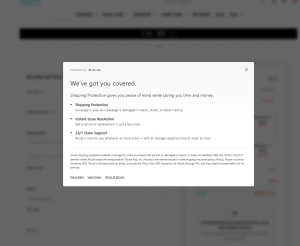
It is a dollar or two for customers to add onto orders under $100. Not only does Route cover the cost of the package if something goes wrong in transit, but their team will also handle the customer service for those claims.
We were worried about this because we pride ourselves on our customer service, but the experience customers have with Route is great. They take this completely off our plate and are very quick to resolve any issues.
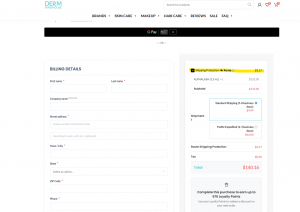
Route is automatically added at checkout (see the highlighted “Shipping Protection” box below). Customers can opt out of this if they choose.
Risk and Compliance eCommerce Stack
Kount (Fraud Protection) – We added Kount after we started getting a lot of fraudulent orders, which were costing our business money through chargebacks and lost products.
Kount catches any orders that look fraudulent. You can set up rules for how you want it to work, and their team will help you with this. For example, if a customer’s billing and shipping addresses are over 300 miles apart or if they are using a brand-new email address, it will flag the order.
Orders can either be automatically declined, or they go into a portal where your team can approve or deny. This software is not cheap, but it has saved us far more than we’ve spent on it.

Photo courtesy of Kount.
Avalara (Sales Tax) – We spent about a year trying to figure out sales tax on our own before adding Avalara. Don’t make the same mistake we did!
As a company just starting out, you likely won’t need this immediately. But as you begin to grow and start hitting Nexus in different states, Avalara simplifies and automates the entire process.
It syncs with the back end of your site and will tell you when you are approaching Nexus in a state. I spoke to multiple accounting firms and got demos of several different software, and nothing lit a candle to what Avalara offers.
They help with registration, file all your returns every month, and take all the work out of a process that is very complex and can be very stressful.
Avalara is expensive, but it has allowed us to sleep well at night knowing our sales tax is compliant.
Marketing eCommerce Stack
Klaviyo (Email Marketing) – Investing in Klaviyo was a breakthrough for us. Before this, we were using MailChimp, which was great for campaign emails but lacked automated flow functionality.
The revenue we generated from abandoned carts, browse abandonment, and a welcome series tied to a pop-up was a complete game-changer.
We now do 40 to 50% of our revenue through Klaviyo. A big part of that is the automated flows that allow us to recover lost revenue.
We’ve built out a robust library of flows, from the more common abandoned cart to a flow letting customers know 3 days before their subscription runs, to a flow telling customers they have unused loyalty points in their account. You can get really creative with what you set up.
Klaviyo is also very robust with list segmentation. We can target people who purchased in the last 60 days, people who looked at an item but didn’t purchase, or people who purchased once but haven’t come back in a certain amount of time.
We have not only used these lists for email campaigns, but also for direct mail campaigns. We were able to pull a list of all customers who have spent over $100 with us over time, but haven’t purchased in the last year. This direct mailer, which offered one of our best discounts, re-engaged customers who hadn’t shopped with us and got them back in our funnel, right in time for Black Friday weekend.
Klaviyo is truly the gold standard when it comes to email marketing for eCommerce.
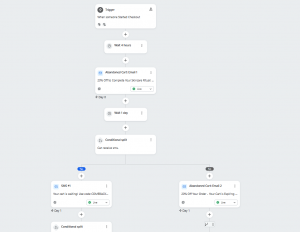
Below is what a flow looks like in Klaviyo (this is our abandoned cart flow). This is just one of the many great aspects of this software.
The 3 Things We’d Tell New eCommerce Business Owners
We didn’t build this tech stack overnight. It grew as our business grew and as we identified each gap. The two things we’d tell anyone starting an eCommerce business:
- Get ShipStation and Trustpilot early. Don’t wait on inventory management if you carry a lot of products.
- Don’t spend a year trying to figure out sales tax yourself. Learn from our mistakes and build the right foundation from the start.
- Invest in Klaviyo. Klaviyo is one of our largest marketing expenses each month, at around $2,500/month. I don’t bat an eye at this because while it’s our most expensive, it also brings the best ROI. We make this back tenfold each month.
Hopefully, you learned some key insights in this post to take away as you grow your eCommerce business.
Start with the foundation, solve your biggest pain point first, and add from there.
When it comes to eCommerce, we’re experts with first-hand experience. If you need help with your business, reach out to our team. Whether you need help setting up your Google Shopping Ads and Merchant Center, getting started with Klaviyo, or need a holistic strategy, we can help.